The goal is not to track how much code AI generates, but whether AI helps the team deliver better software with less friction and lower risk.
Metrics like prompts used, accepted suggestions, commits, or pull request volume can show activity, but they do not prove real engineering impact. A stronger measurement approach looks at whether AI improves cycle time, review quality, defect rates, rework, documentation, and overall team confidence.
For software teams using AI across development, testing, review, and documentation, the real question is simple: is AI improving engineering outcomes, or is it just creating more output for humans to check?
At Flexisource IT, we help businesses build software teams that use AI responsibly, with clear standards, strong review practices, and measurable delivery outcomes.
Why Traditional Engineering Metrics Do Not Work Well for AI
Traditional engineering metrics can still be useful, but they become risky when used on their own to measure AI performance. AI changes how work is produced, reviewed, and integrated. That means the old habit of tracking output alone can make productivity look better than it really is.
For example, if AI helps a developer write code faster, that sounds like a win. But if the same code creates longer reviews, more revisions, or more production issues, the team has not improved performance. It has only moved the work somewhere else.
More Code Does Not Mean More Value
Lines of code, commit count, and pull request volume are weak AI performance metrics when used alone. AI can produce code quickly, but more code does not automatically mean more customer value, better architecture, or stronger delivery.
In some cases, more AI-generated code can increase complexity. Reviewers may need extra time to understand whether the code fits the product, follows internal standards, handles edge cases, and remains maintainable. This matters because software engineering is not just about writing code. It is about solving the right problem in a way that future teams can safely support.
A better question is not, “How much code did AI help us produce?”
You should be asking, “Did the AI-assisted work improve delivery without increasing risk?”
AI Can Move the Bottleneck Downstream
AI often speeds up the earliest part of development: drafting code, generating tests, summarising documentation, or exploring solutions. But that does not mean the whole software delivery system becomes faster.
DX notes that AI can speed up code generation while creating new bottlenecks in review and integration. It also points out that AI tools often lack the institutional context needed for complex real-world engineering problems.
This is where many teams misread AI impact. Developers may feel faster because the first draft takes less time. However, reviewers, QA engineers, tech leads, and release managers may carry more of the burden later.
For AI-assisted software development, performance measurement should include review time, revision depth, stalled pull requests, rework, and change failure rate. Axify also recommends comparing AI-assisted work against normal delivery patterns so leaders can see whether AI is improving flow, quality, and reliability.
Developer Perception Can Differ From Measured Results
AI tools can feel productive because they reduce friction during coding. That perception is useful, but it should not be treated as proof.
METR ran a randomised controlled trial with experienced open-source developers working on their own repositories. In that specific setting, developers took 19% longer when allowed to use AI tools, even though they believed AI had sped them up. METR also cautioned against overgeneralising the result to all software development work.
The lesson is not that AI slows every team down. The lesson is that perception and performance can diverge. Engineering leaders need evidence from their own teams, workflows, and codebases before deciding whether AI is truly improving productivity.
Developers in METR’s study took 19% longer to complete tasks when using AI — while believing they were faster.19% Longer
What AI Performance Really Means in Software Engineering
AI performance is the measurable effect AI has on how a software team works and what it delivers. It should include both productivity and risk.
A useful measurement framework should answer these questions:
- Are developers using AI tools consistently and responsibly?
- Is work moving through the delivery pipeline faster?
- Are code reviews becoming easier or harder?
- Is code quality stable or improving?
- Are teams reducing rework, incidents, and defects?
- Is AI spend producing a clear return?
- Are developers more confident, or more cognitively overloaded?
This gives engineering leaders a more complete view of AI impact.
Adoption Is Only the Starting Point
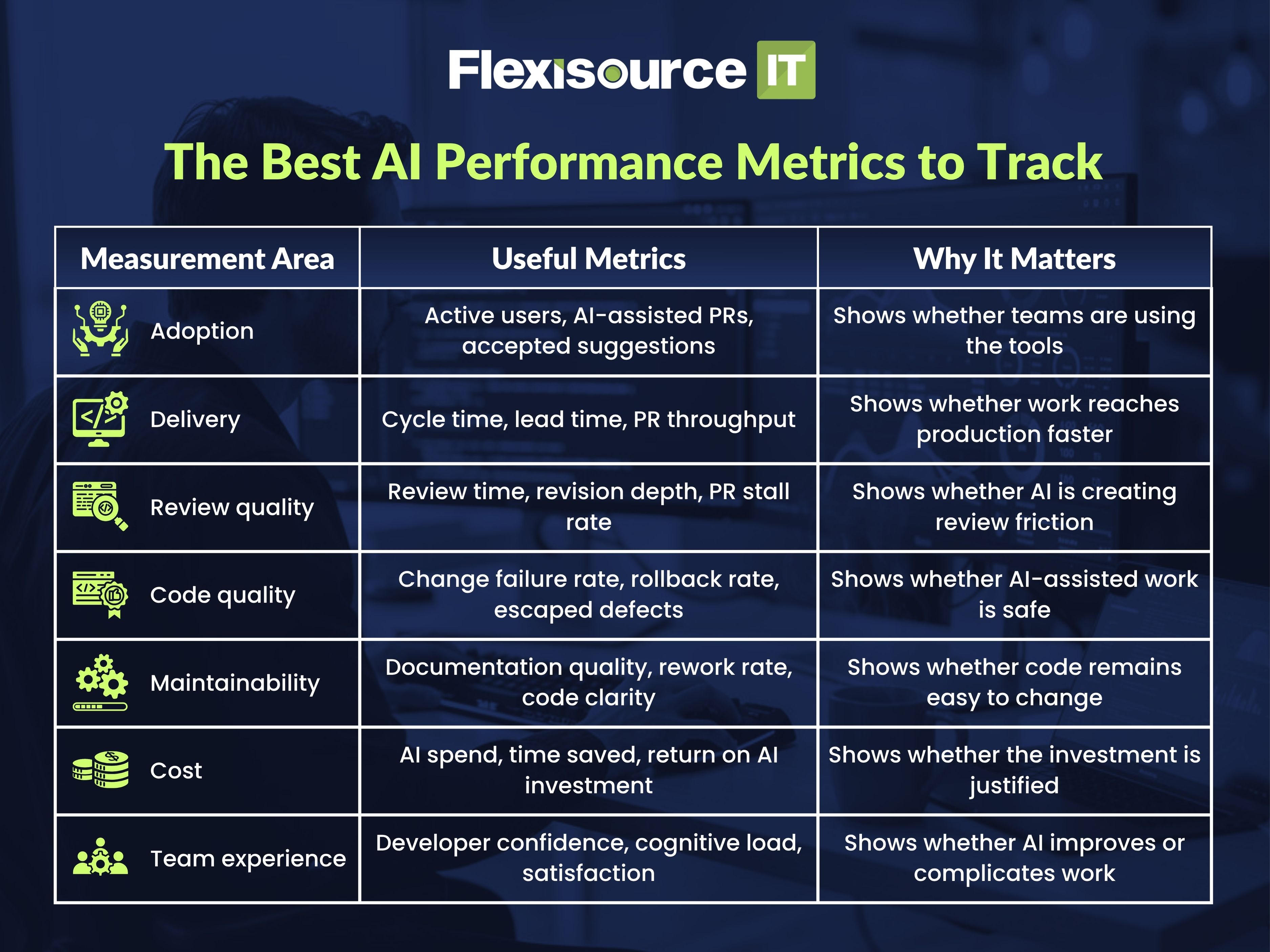
Adoption metrics show whether developers are using AI tools. These may include daily or weekly active users, AI-assisted pull requests, accepted suggestions, or AI-assisted commits. These numbers matter because unused tools cannot create value. However, adoption alone does not prove AI is improving software engineering performance.
A team can have high AI usage and still suffer from poor review quality, unclear documentation, or rising defect rates. Adoption tells you whether AI is present. It does not tell you whether AI is helping.
Related: How to Hire AI Developers, Ethical Use of AI in Hiring: How Businesses Can Recruit Faster Without Losing the Human Touch
Impact Shows Whether Engineering Outcomes Improve
Impact metrics show whether AI is changing delivery outcomes. These include cycle time, lead time, pull request review time, first-pass review quality, change failure rate, rollback rate, and rework.
Axify highlights metrics such as revision depth, PR stall rate, change failure rate, MTTR, and rollback rate because they show whether AI-assisted work is creating smoother delivery or adding hidden friction.
This is the layer that matters most to engineering managers. If AI increases output but also increases review effort and production risk, the team needs stronger guardrails before scaling usage.
Cost Shows Whether the Investment Is Worth It
AI tools also need to be measured against cost. This includes licence fees, implementation time, training, security review, governance, and any extra review effort created by AI-assisted work.
The goal is not to calculate a perfect number. It is to understand whether AI spend is improving engineering economics over time. If cost rises without better delivery, quality, or developer experience, the AI strategy needs to be adjusted.
The Best AI Performance Metrics to Track
4 Metrics You Should Not Use Alone
Some AI metrics look useful at first, but they can easily mislead engineering leaders when viewed in isolation.
1. Lines of Code Generated
Lines of code generated is one of the weakest ways to measure AI performance. More code does not always mean better software. In some cases, it can mean more complexity, longer reviews, and more maintenance work later.
2. Number of AI Prompts or Tool Sessions
Prompt volume only shows that developers are using AI tools. It does not show whether the output was correct, useful, secure, or maintainable.
3. Accepted AI Suggestions
Accepted suggestions can also be misleading. A developer may accept an AI-generated suggestion, then rewrite it, debug it, or spend extra time validating it during review. Usage does not automatically equal value.
4. Pull Request Volume
Higher pull request volume may be positive, but only if quality remains stable. DX notes that AI can increase code production faster than teams can absorb the review and validation burden, which is why quality metrics need to sit beside throughput metrics.
How to Measure AI Impact Without Misreading the Data
AI performance should be measured over time, not judged from one sprint or one tool dashboard. The goal is to understand whether AI is improving the whole delivery system.
Establish a Pre-AI Baseline
Before expanding AI usage, measure your current engineering performance. This should include cycle time, review time, defect rates, change failure rate, rollback rate, developer satisfaction, and documentation quality.
Without a baseline, teams may mistake normal delivery changes for AI impact.
Compare AI-Assisted and Non-AI Work
Where possible, compare AI-assisted work with non-AI work across similar tasks, teams, or repositories. Axify recommends tracking AI-assisted work against delivery and quality signals such as revision depth, PR stall rate, change failure rate, MTTR, and rollback rate.
This helps leaders see whether AI is reducing friction or simply creating work that looks faster at the start but takes longer to review.
Track Second-Order Effects
AI can create hidden costs. These may include larger pull requests, unclear reasoning, weak documentation, extra review time, or more rework.
A good measurement model should ask:
- Are reviews getting easier or harder?
- Are developers spending less time rewriting AI output?
- Are defects increasing or decreasing?
- Is documentation improving?
- Are offshore and distributed teams getting enough context?
These signals show whether AI is improving engineering performance beyond the coding stage.
Read: AI Coding Assistants Are Making Offshore Code Reviews Harder, Not Easier. Here’s Why
Measuring AI Performance in Offshore and Distributed Software Teams
AI measurement becomes even more important in offshore and distributed teams because work depends heavily on shared context, clear documentation, and consistent review standards.
Documentation Quality Matters More With AI
AI-generated code still needs human explanation. Offshore teams need clear comments, ticket notes, handover details, and architecture context so reviewers understand not only what changed, but why it changed.
Code Review Standards Need to Be Stronger
When AI increases output, code review becomes more important. Teams should define what reviewers must check, including business logic, security, edge cases, maintainability, and alignment with internal standards.
Shared Context Is a Performance Metric
If AI-assisted work creates confusion across locations or time zones, that is a performance issue. A team may be producing more code, but still slowing down because context is missing.
For distributed teams, AI performance should include communication quality, handover clarity, and how easily other developers can understand and maintain the work.
A Simple 30/60/90-Day AI Measurement Plan
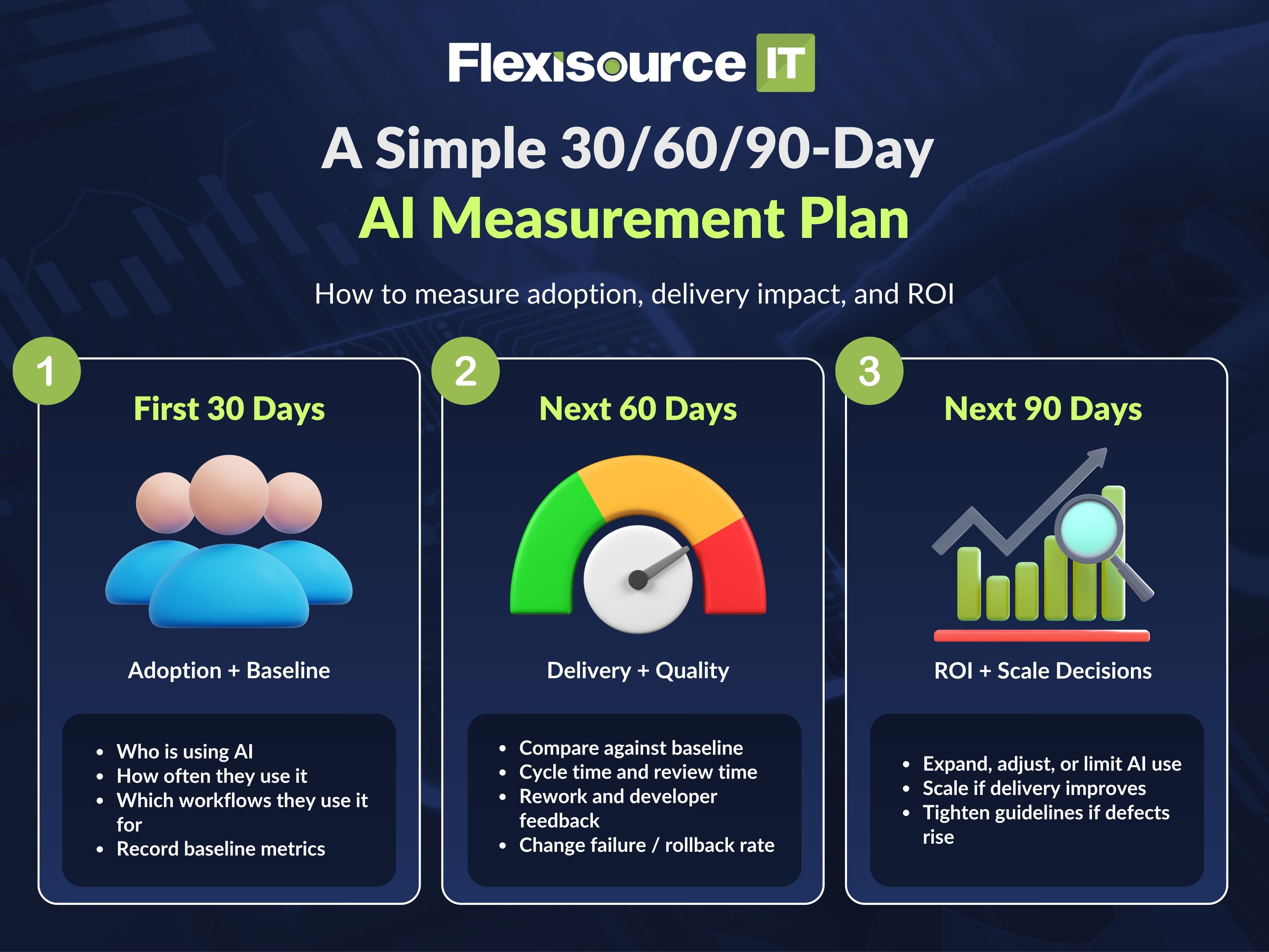
First 30 Days: Measure Adoption and Baseline
Track who is using AI, how often they use it, and which workflows they use it for. At the same time, record your current delivery, quality, review, and cost metrics.
Next 60 Days: Measure Delivery and Quality Changes
Compare AI-assisted work against your baseline. Look at cycle time, review time, rework, change failure rate, rollback rate, and developer feedback.
Next 90 Days: Measure ROI and Scale Decisions
Decide whether AI should be expanded, adjusted, or limited. If AI improves delivery without harming quality, scale it. If it increases review burden or defects, strengthen guidelines before wider rollout.
How Flexisource IT Helps Teams Use AI Responsibly
Flexisource IT helps businesses build software teams that use AI with strong engineering discipline. Our developers do not treat AI as a shortcut around quality. They use it as a support tool while following clear review, testing, documentation, and maintainability standards.
For offshore and distributed teams, this matters. AI can improve productivity, but only when teams have the right processes around it.
Final Thoughts: Measure AI by Outcomes, Not Output
AI performance in software engineering is not about how much code AI writes. It is about whether teams deliver better software with less friction, lower risk, and stronger long-term maintainability.
If you want to build software teams that use AI responsibly, Flexisource IT can help. Contact us today to learn how our offshore software development teams support AI-assisted engineering with clear standards, strong review practices, and measurable outcomes.