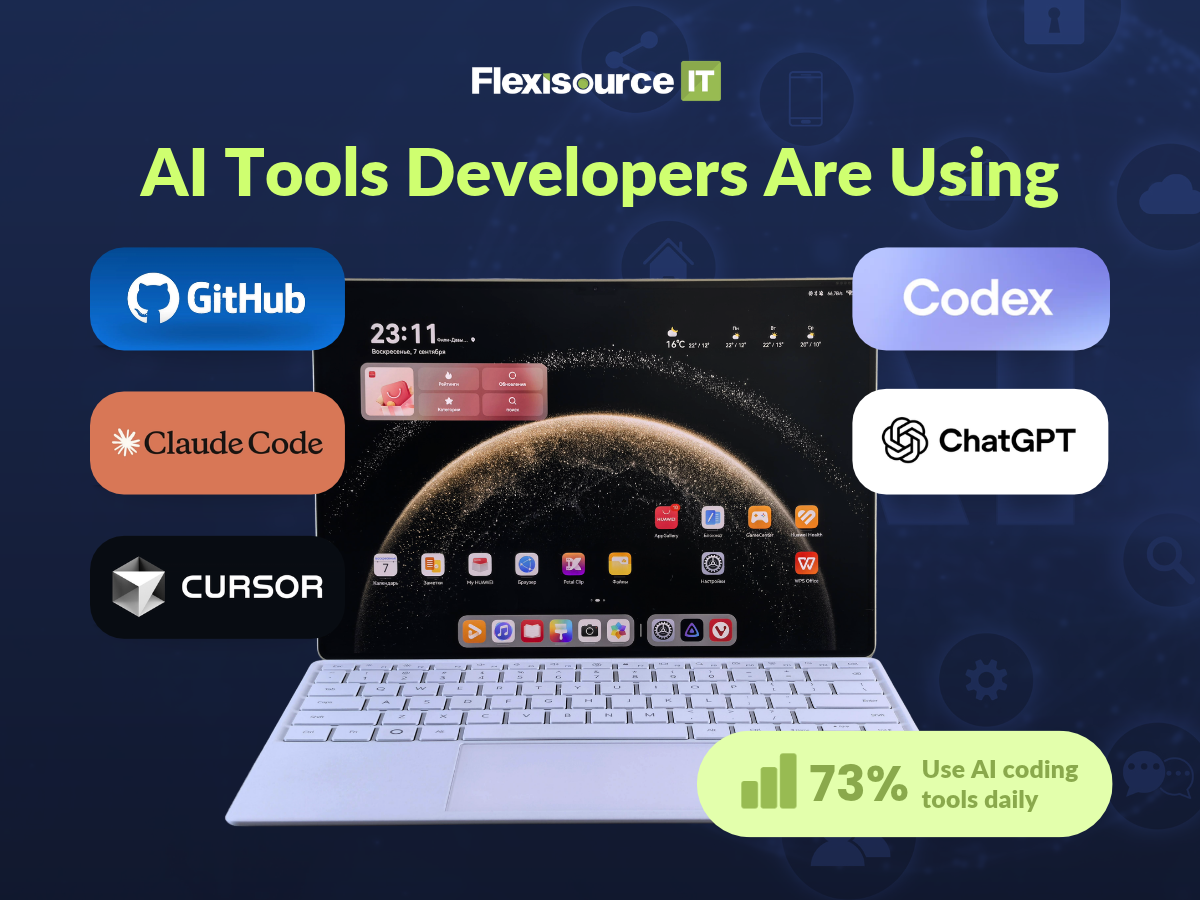
The AI tools developers commonly use include GitHub Copilot for coding assistance, Claude Code and Codex for multi-step development tasks, Cursor for AI-assisted editing, and ChatGPT for debugging, code explanations and technical research. These tools can make everyday development easier, but their value depends on the task, the codebase and how much human review their output requires.
For AI in software development teams, the most useful tools are not necessarily those generating the most code. They’re the ones that help developers complete reliable work without creating extra debugging, testing or integration problems.
At Flexisource IT, we understand the importance of combining modern development tools with experienced offshore professionals who can apply technical judgement, maintain coding standards and deliver quality software.
Which AI Tools Are Developers Actually Using?
AI coding tools have become part of everyday engineering workflows, although developers use them differently depending on their responsibilities.
According to the Stack Overflow Developer Survey 2026, 73% of respondents who use AI coding assistants or agents reported using them daily. Claude Code, GitHub Copilot, Codex and Cursor were among the most widely used tools in the survey.
These are broader developer survey findings, not usage statistics specific to offshore teams. However, they provide useful context for understanding which tools are gaining traction and what they offer.
GitHub Copilot for Everyday Coding Assistance
GitHub Copilot is useful for developers who want AI assistance without leaving their existing development environment. Its inline suggestions can help complete functions, generate familiar code patterns and reduce repetitive typing. Developers can accept, modify or reject suggestions as they work.
For example, a developer writing validation rules for a form might use Copilot to complete repetitive conditions rather than writing each one manually. The limitation is context. A suggestion may be syntactically correct without matching the application’s business requirements.
Copilot is useful for accelerating familiar work, but developers still need to understand every change they accept.
Claude Code for Multi-Step Engineering Tasks
Claude Code is designed for more involved development work. It can explore repositories, read files, edit code, run commands and support testing. This makes it useful for tasks such as investigating bugs across multiple files, refactoring related components and understanding unfamiliar codebases.
However, greater autonomy introduces more responsibility for the developer. If an agent changes several files, someone must verify that the changes are necessary, follow the existing architecture and do not introduce unexpected behaviour.
Cursor for Editor-Based Development
Cursor brings AI assistance directly into the coding environment, allowing developers to explore files, request changes and review generated edits.
For example, a developer could use Cursor to locate the code responsible for an API error, propose a fix and inspect the changes before accepting them. Its agent functionality supports codebase searches, multi-file edits and terminal commands.
The benefit is having relevant assistance close to the code. The limitation is that a convenient editing workflow does not guarantee the proposed implementation is correct.
Codex and ChatGPT for Different Development Tasks
Codex and ChatGPT can support different parts of a developer’s workflow.
Codex can work on coding tasks involving repositories, code changes and tests. It is particularly relevant when a developer wants to delegate a clearly defined implementation or investigation task and review the result.
ChatGPT can help explain unfamiliar concepts, explore debugging approaches, compare implementation options and draft technical documentation.
For offshore teams, both can be useful when working through unfamiliar systems or preparing explanations for other developers. However, confidential source code and client information should only be used with tools and configurations approved by the organisation.
What AI Actually Does During a Developer’s Workday
The clearest way to understand AI and offshore development is to look at the tasks developers encounter during a normal working day. Consider an offshore developer assigned to fix an API validation issue in an existing application.
Understanding an Unfamiliar Codebase
Before making changes, the developer needs to identify which files handle incoming requests, where validation happens and how errors are returned.
An AI coding assistant can help explain relevant functions and identify possible dependencies. This can reduce the time spent manually searching through unfamiliar code. However, the explanation remains a starting point. Developers still need to inspect the actual implementation because AI can misunderstand dependencies or overlook undocumented behaviour.
Writing Routine Code and Fixing Bugs
Once the developer understands the issue, AI can help suggest validation logic, generate repetitive code or propose possible fixes. This works particularly well when the task has clear requirements and follows established patterns. The developer must still check edge cases, error handling and compatibility with existing functionality.
For example, a suggested fix might address an invalid input but accidentally change how legitimate requests are processed. That is why testing remains essential.
Preparing Tests, Documentation and Pull Requests
After implementing the fix, AI can assist with drafting unit tests, explaining changes and preparing a pull request description. This can make documentation faster, particularly when multiple developers need to understand the work asynchronously.
However, AI-generated tests may simply reflect assumptions in the generated code. A passing test is not meaningful if it checks the wrong behaviour. The developer must confirm that the tests reflect the actual requirements before submitting the work for review.
Which AI Coding Tools Don’t Live Up to the Hype?
The biggest disappointment is not necessarily a particular product. It is the expectation that AI can complete complicated engineering work without meaningful supervision.
AI can produce impressive results quickly, but developers still need to account for incorrect assumptions, unnecessary changes and the time required to validate its output.
Autonomous Agents That Still Need Constant Supervision
Autonomous coding agents can investigate repositories, modify files and run tests. However, giving an agent a broad instruction does not guarantee a production-ready result.
A request to improve application performance, for example, might produce changes that appear useful but introduce unnecessary complexity or affect unrelated functionality. These tools generally work better when developers provide specific requirements, limit the scope and review the results before integration.
AI-Generated Code That Looks Correct but Isn’t
One frustrating limitation is code that appears reasonable but contains subtle errors.
The Stack Overflow Developer Survey 2026 found that 69.3% of respondents identified plausible but incorrect AI-generated code as a problem that had cost them or their teams time. Another 54.2% identified difficult-to-review generated code.
69.3% Report Time Lost to Incorrect AI-Generated Code
Common problems include incorrect dependencies, outdated APIs, overlooked edge cases and assumptions that do not match the application. For distributed engineering teams, this can make AI-assisted code reviews more demanding, particularly when reviewers lack the context behind generated changes.
Read: AI Coding Assistants Are Making Offshore Code Reviews Harder, Not Easier. Here’s Why
AI Code Reviews That Miss Business Context
Automated reviews can help identify suspicious patterns, potential defects and inconsistent code, but they cannot be relied upon to understand every product requirement or technical decision.
A change may follow coding standards while still implementing the wrong business logic. This is why AI code reviews should support experienced engineers rather than replace established approval processes.
Too Many AI Subscriptions Without Clear Benefits
More tools do not automatically mean greater productivity. If developers constantly switch between assistants offering similar capabilities, the team may spend more time managing tools than improving delivery.
Businesses should evaluate whether each subscription solves a specific problem and whether its benefits justify the cost.
AI Tools Comparison: Where They Help and Where They Fall Short
The table below compares typical development workflows rather than ranking tools by overall performance.
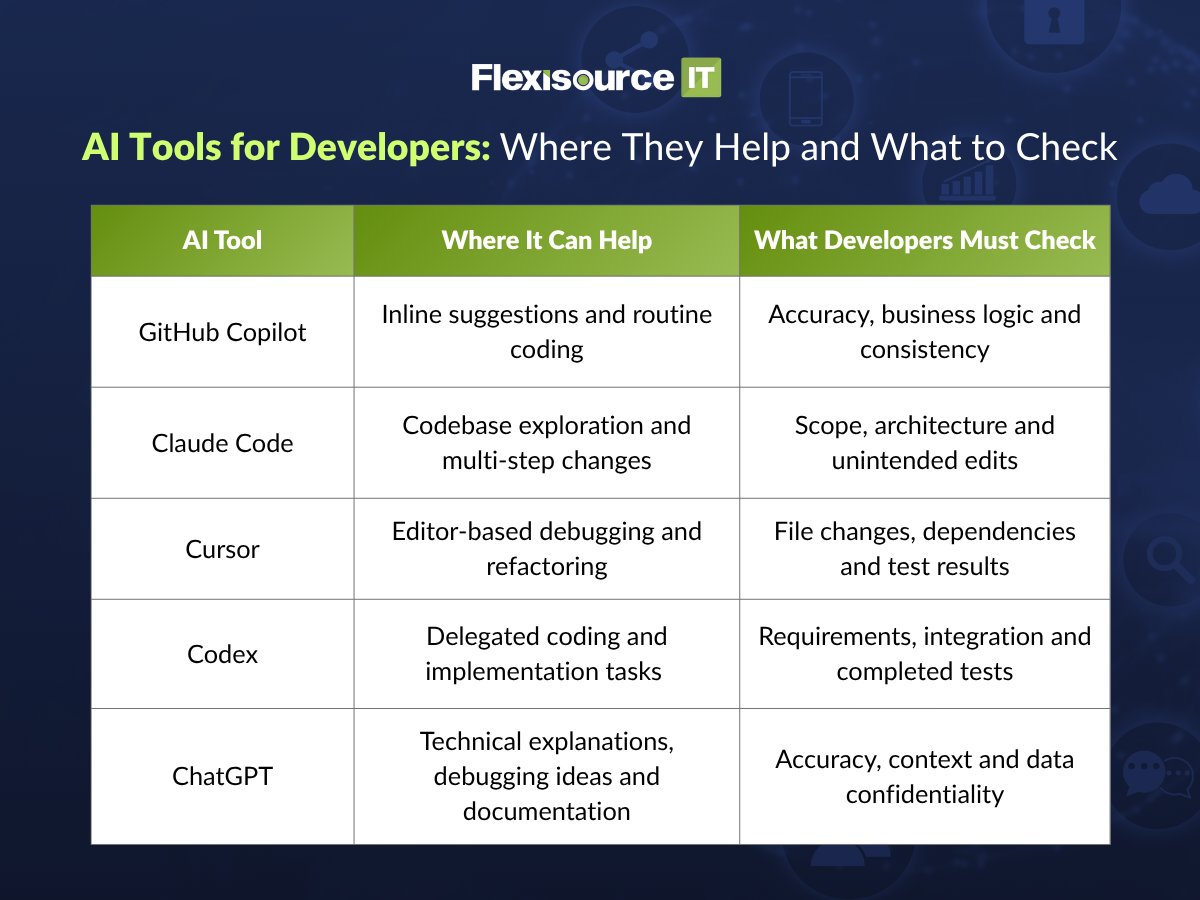
The right tool depends on how your developers work. A team handling routine implementation may benefit from inline assistance, while one managing complex repositories may need stronger codebase exploration capabilities.
What Changes When AI Is Used in Offshore Development Teams?
AI tools can support offshore developers, but their effectiveness depends on how well the team shares information, reviews code and manages delivery. In AI in IT outsourcing, these practices become especially important when developers collaborate across locations and time zones.
AI Still Needs Shared Project Context
AI can inspect available code and documentation, but it may not know why a particular architectural decision was made or which business rules must remain unchanged.
Offshore developers need access to clear requirements, coding standards and relevant project history. Without this information, AI-generated changes may technically work while conflicting with the broader application.
Human Code Reviews Become More Important
Faster code generation can increase the amount of work entering review.
Developers should therefore keep pull requests focused, explain significant implementation decisions and provide evidence that changes have been tested. Strong review practices help ensure AI assistance improves delivery without weakening quality.
Clear Handovers Prevent AI-Generated Confusion
Offshore developers often collaborate asynchronously with Australian teams.
A useful handover should explain what changed, why it changed, which tests were completed and whether any issues remain unresolved. AI can help prepare these summaries, but developers must verify their accuracy before sharing them.
How Should Engineering Managers Choose AI Tools for Their Offshore Team?
The best approach is to evaluate tools against actual development work instead of relying on product demonstrations.
Before introducing a new AI tool, assess:
- Workflow fit: Does it solve a recurring development problem?
- Code quality: Are generated changes accurate and maintainable?
- Review effort: Does it save time after testing and corrections?
- Security: Can it meet client data and repository access requirements?
- Integration: Does it work with existing development tools?
- Cost: Are measurable benefits worth the subscription and usage costs?
A small pilot using representative development tasks can reveal whether a tool genuinely improves performance.
For a clearer assessment, measure AI performance in software engineering through delivery speed, review effort, defects, rework and developer experience rather than usage statistics alone.
Read: How to Measure AI Performance in Software Engineering
How Flexisource IT Supports AI-Aware Software Development Teams
At Flexisource IT, we help Australian businesses access offshore developers and technical professionals who can work within established engineering processes.
Experienced Developers With Strong Technical Judgement
AI familiarity is useful, but effective development still requires technical knowledge, problem-solving and accountability. Businesses should prioritise developers who understand how to evaluate AI-generated work rather than simply produce it. This also makes ethical AI hiring relevant when selecting offshore technical talent.
Development and QA Support That Fits Existing Workflows
Our software development and QA testing services support businesses that need technical capability aligned with their projects. Whether AI tools are used or not, reliable delivery still depends on clear requirements, consistent testing and effective collaboration.
Flexible Offshore Teams as Technology Changes
As AI tools evolve, development requirements will continue to change. Flexisource IT helps businesses build offshore teams around their technical needs, supporting long-term development capability without relying on automation alone.
Final Thoughts: The Best AI Tool Is the One That Makes the Work Better
AI coding assistants are becoming part of everyday software development, but popularity does not guarantee better results.
GitHub Copilot, Claude Code, Cursor, Codex and ChatGPT can all support useful development tasks. Their value depends on how reliably they help developers complete work without creating unnecessary review, debugging or maintenance problems.
For AI in software development teams, experienced engineers, clear standards and effective collaboration remain essential.
Looking to build an offshore development team that can adapt to modern engineering workflows? Contact Flexisource IT to discuss your software development and QA staffing requirements.