
Software demand continues to grow faster than most businesses can keep up with. Companies are expected to launch new applications, automate processes, improve customer experiences, and support digital transformation initiatives, often with limited development resources and increasing pressure to deliver quickly.
At the same time, hiring experienced developers in Australia can be expensive and competitive. This has led many organisations to explore faster ways to build applications and automate workflows without relying entirely on traditional software development.
Now, that is why we have low-code and no-code platforms.
These platforms help businesses accelerate enterprise development by reducing the amount of coding required, enabling faster delivery of applications and business solutions. However, speed alone is not enough. Long-term success still depends on governance, security, scalability, and technical oversight.
What Are Low-Code and No-Code Platforms?
Low-code and no-code platforms are development environments that allow users to build applications using visual interfaces, drag-and-drop components, and pre-built functionality instead of writing large amounts of code from scratch.
Both approaches help accelerate enterprise application development, but they serve different users and business needs.
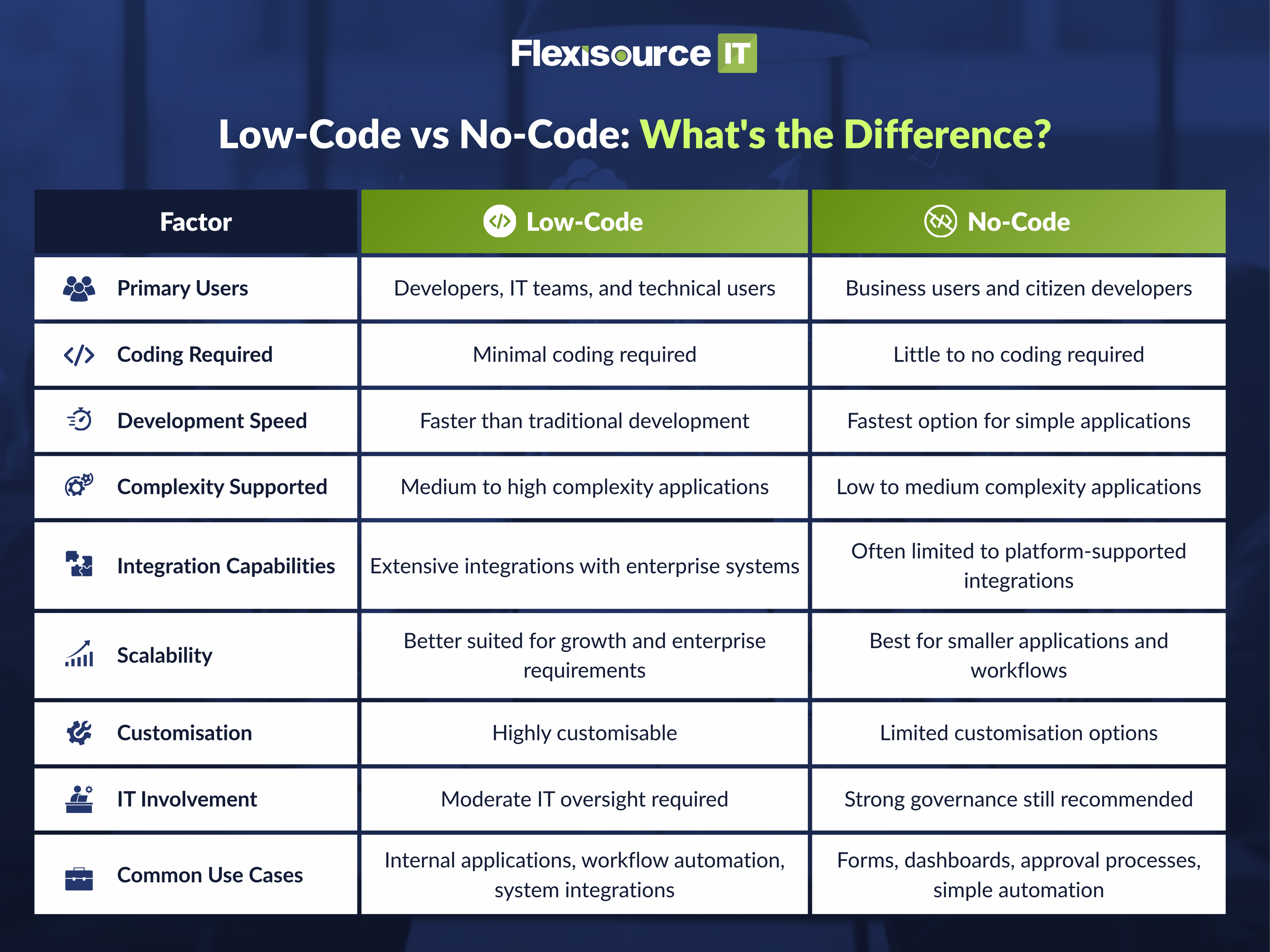
Low-Code vs No-Code: What’s the Difference?
What Is Low-Code Development?
Low-code development uses visual tools, templates, and reusable components to reduce manual coding. Developers can build applications more quickly while still having the flexibility to add custom functionality when needed.
This approach is particularly useful for organisations that want to accelerate development without sacrificing scalability, integrations, or business-specific requirements.
What Is No-Code Development?
No-code development allows non-technical users to build simple applications without writing code. Business users can create forms, workflows, dashboards, and automation tools using visual builders and drag-and-drop interfaces.
No-code platforms help reduce IT bottlenecks by allowing departments to solve smaller business challenges independently.
Why Are Enterprises Turning to Low-Code and No-Code?
The demand for software is just strong and continues to increase across every industry.
Low-code and no-code platforms provide a practical way to meet that demand without dramatically increasing development costs or expanding internal teams.
Faster Application Delivery
Traditional development projects can take months to complete. Low-code and no-code platforms allow businesses to build and launch solutions much faster by using pre-built components and visual development tools.
This helps organisations respond more quickly to changing business needs and market opportunities.
Reduced IT Backlog
Many IT departments struggle with large queues of requests for new applications, reports, and process improvements. Low-code and no-code development helps reduce these backlogs by allowing business users to handle simpler projects while developers focus on more complex initiatives.
Lower Development Costs
Building applications from scratch often requires significant time and resources. By reducing development effort, low-code platforms can help lower project costs while still delivering business value.
Faster Prototyping and MVP Creation
Many organisations use low-code and no-code platforms to create prototypes and minimum viable products (MVPs). This allows teams to test ideas quickly before investing in full-scale development.
Better Collaboration Between Business and IT Teams
Low-code and no-code platforms create a shared environment where technical and non-technical users can collaborate more effectively. Business teams can contribute directly to application design while IT provides oversight and governance.
Workflow Automation
Many repetitive business processes can be automated using low-code and no-code tools. This improves efficiency, reduces manual work, and frees employees to focus on higher-value activities.
Empowering Citizen Developers
Citizen development allows non-technical employees to build solutions for their own departments. When properly governed, citizen development can accelerate innovation across the organisation.
Common Use Cases for Enterprise Low-Code and No-Code
Not every business application requires custom software development. Many internal systems and processes can be delivered effectively using low-code and no-code platforms.
- Internal Workflow Automation: Businesses frequently use low-code development to automate repetitive processes such as approvals, document routing, and task management.
- Employee Onboarding Portals: Low-code and no-code platforms can simplify employee onboarding by creating structured workflows, forms, and information portals.
- Approval Systems: Departments often build approval workflows for procurement requests, leave applications, expense submissions, and operational processes.
- CRM and ERP Extensions: Many organisations use low-code platforms to extend existing CRM and ERP systems without modifying core software.
- Data Collection Forms: Business teams can quickly create forms for surveys, audits, compliance checks, and operational reporting.
- Reporting Dashboards: No-code platforms often include visual reporting tools that help teams access business data more easily.
- Customer Service Tools: Businesses can develop customer service workflows, ticketing systems, and support portals to improve operational efficiency.
- MVPs and Proof-of-Concept Applications: Low-code development is particularly useful for validating ideas before committing to larger software investments.
When Should You Use Low-Code, No-Code, or Custom Development?
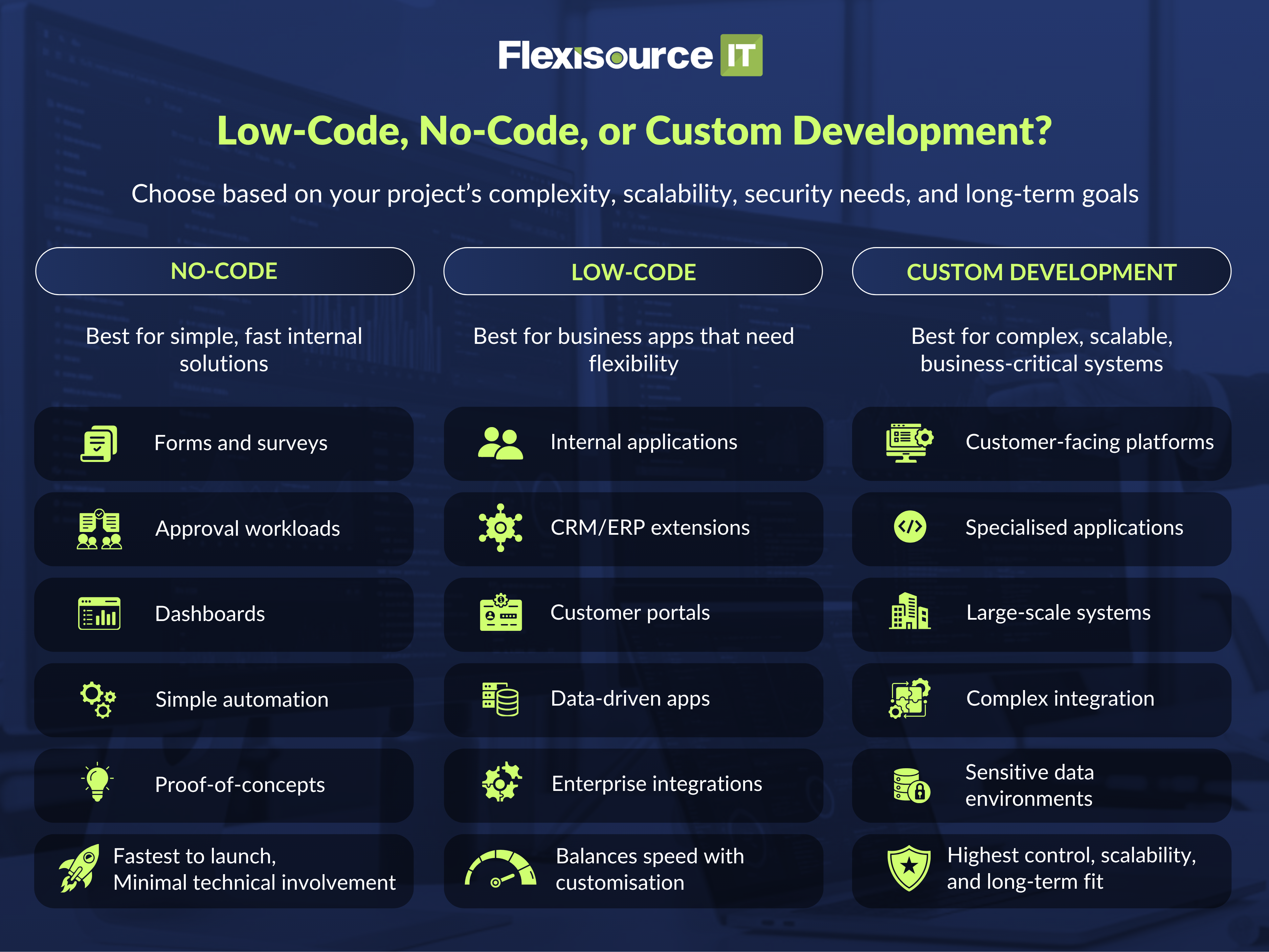
There is no single solution that works for every project. The right choice depends on complexity, scalability requirements, security considerations, and long-term business goals.
Use No-Code When…
No-code platforms are ideal for:
- Internal forms and surveys
- Approval workflows
- Reporting dashboards
- Simple automation
- Business process improvements
- Rapid proof-of-concept projects
These solutions can often be delivered quickly without developer involvement.
Use Low-Code When…
Low-code platforms work best for:
- Internal business applications
- Workflow automation across departments
- CRM and ERP extensions
- Customer portals
- Data-driven applications
- Enterprise integrations
This approach balances speed with flexibility.
Use Custom Development When…
Custom software development is often necessary for:
- Customer-facing platforms
- Highly specialised business applications
- Large-scale enterprise systems
- Complex integrations
- Sensitive data environments
- Competitive business products
Custom development provides the highest level of control and scalability.
The Best Approach Is Often a Hybrid One
Many enterprises achieve the best results by combining all three approaches.
Simple workflows may use no-code platforms, internal applications may use low-code development, and mission-critical systems may rely on custom software development.
Low-Code vs. No-Code vs. Custom Development
| Factor | No-Code | Low-Code | Custom Development |
| Speed | Fastest | Fast | Slower |
| Cost | Lowest | Moderate | Highest |
| Complexity Supported | Low | Medium to High | Unlimited |
| Scalability | Limited | Good | Excellent |
| Customisation | Limited | Moderate to High | Complete |
| Enterprise Integrations | Basic | Strong | Extensive |
| Governance Required | High | High | Standard SDLC Governance |
The Risks of Low-Code and No-Code Without Governance
Low-code and no-code platforms offer significant benefits, but they can also create new challenges if not managed properly.
- Shadow IT: Business users may build applications without IT involvement, creating systems that lack oversight and security controls.
- Security and Compliance Risks: Applications that handle sensitive data must comply with security and regulatory requirements. Without governance, organisations may expose themselves to unnecessary risks.
- Poor Data Governance: Uncontrolled applications can create duplicate data sources and inconsistent reporting. This can reduce trust in business information.
- Integration Challenges: Many business processes depend on multiple systems working together. Poorly designed integrations can create operational issues and maintenance challenges.
- Platform Lock-In: Some platforms make it difficult to move applications elsewhere in the future. Businesses should evaluate long-term flexibility before committing to a platform.
- Scalability Limitations: Applications that begin as simple solutions can eventually outgrow platform capabilities. Planning for future growth is essential.
- Technical Debt: Quick solutions built without proper oversight can become difficult to maintain over time. Speed without structure often creates long-term complexity.
Common Low-Code and No-Code Mistakes Enterprises Should Avoid
Allowing Shadow IT to Grow Unchecked
One of the biggest risks of low-code and no-code adoption is the growth of shadow IT, where employees create applications without the knowledge or involvement of the IT department. While these solutions may solve immediate business problems, they can also create security gaps, duplicate systems, and inconsistent processes across the organisation.
Over time, businesses can lose visibility into who owns an application, what data it accesses, and how it connects to other systems. Without clear governance, what starts as a helpful tool can quickly become a maintenance and compliance challenge. Organisations should encourage innovation while still maintaining oversight, standards, and accountability.
Building Applications Without Security Reviews
Speed is one of the biggest advantages of low-code and no-code platforms, but it should never come at the expense of security. Many applications built through these platforms still handle employee records, customer information, financial data, or other sensitive business information.
Without proper security reviews, businesses may expose themselves to risks such as unauthorised access, data leaks, weak authentication controls, or regulatory compliance issues. Security should be built into the development process from the start, with IT teams reviewing data access, user permissions, integrations, and compliance requirements before applications are deployed.
Choosing Platforms Based Only on Speed
Many organisations choose a low-code or no-code platform because it promises rapid development and quick results. While speed is important, it should not be the only factor when evaluating a platform.
Businesses should also consider integration capabilities, security features, scalability, vendor support, governance controls, and long-term maintenance requirements. A platform that helps a team build quickly today may create limitations later if it cannot support future business needs. The best platform is not necessarily the fastest one, but the one that aligns with both current goals and long-term strategy.
Ignoring Long-Term Scalability Requirements
Many low-code and no-code projects begin as small internal tools designed for a single team or department. Because of this, scalability is often overlooked during the planning stage.
However, successful applications tend to grow. More users may need access, additional workflows may be added, and larger volumes of data may need to be processed. A solution that performs well for a small group of users may struggle when adopted across the entire organisation. Businesses should evaluate whether a platform can support future growth before investing heavily in development and deployment.
Treating Low-Code as a Replacement for Professional Developers
Low-code development can significantly accelerate delivery, but it should be viewed as a complement to professional software development rather than a replacement. While business users can build simple applications and automate workflows, more complex systems still require technical expertise.
Enterprise applications often involve integrations, security requirements, performance optimisation, data governance, and scalability considerations that go beyond the capabilities of citizen developers. Experienced developers, architects, and technical leaders play a critical role in ensuring that solutions remain secure, reliable, and maintainable as the organisation grows.
The most successful enterprises combine the speed of low-code and no-code with the expertise of professional development teams.
How to Adopt Low-Code and No-Code Successfully
Low-code and no-code success is not just about building applications faster. The organisations that see the best results are the ones that put the right processes, governance, and technical oversight in place from the beginning.
Here are some practical steps to help ensure long-term success:
Define Approved Platforms and Use Cases
Not every platform is suitable for every business need. Organisations should identify which low-code and no-code platforms are approved for use and clearly define the types of applications that can be built on them.
Having these guidelines in place helps reduce risk, improve consistency, and prevent teams from creating solutions that fall outside security or compliance requirements.
Set Governance and Security Standards
Governance should be established before applications are developed, not after they are already in use. Clear standards help ensure that all solutions meet the organisation’s security, compliance, and data management requirements.
This includes defining approval processes, user permissions, security reviews, and ongoing monitoring practices.
Involve IT Early
IT teams should be involved from the beginning to provide technical guidance and identify potential issues before they become larger problems. Early involvement helps ensure that applications align with existing systems, policies, and business objectives.
It also creates better collaboration between business users and technical teams throughout the development process.
Create Reusable Components and Templates
Reusable templates, workflows, and components help teams build applications more efficiently while maintaining consistency across the organisation. Instead of creating everything from scratch, users can work from approved building blocks.
This reduces duplication, improves quality, and makes ongoing maintenance much easier.
Review Integrations and Data Access
Many low-code and no-code applications need access to existing business systems and data sources. Every integration should be reviewed carefully to ensure information is shared securely and only authorised users have access.
Strong oversight helps prevent data silos, security vulnerabilities, and compliance issues from developing over time.
Train Business Users
Citizen developers should understand not only how to use the platform, but also the responsibilities that come with building business applications. Training helps users follow best practices and avoid common mistakes.
A well-trained workforce can accelerate innovation while still supporting governance and security requirements.
Establish Technical Ownership
Every application should have a clearly identified owner who is responsible for its performance, maintenance, and ongoing management. Without ownership, applications can quickly become outdated or unsupported.
Clear accountability also makes it easier to manage updates, security reviews, and future enhancements.
Know When to Move to Custom Development
Not every solution should remain on a low-code or no-code platform forever. As applications become more complex, businesses may reach a point where custom development provides greater flexibility and scalability.
Recognising this transition point early helps organisations avoid technical limitations and ensures applications can continue to support future growth.
Building Faster Without Sacrificing Quality
Low-code and no-code platforms can dramatically improve development speed, but technical quality should never be sacrificed for short-term gains.
The most successful enterprises combine rapid development tools with strong governance, technical leadership, quality assurance, and experienced software development teams. This approach allows businesses to innovate faster while maintaining security, scalability, and long-term maintainability.
How Flexisource IT Helps Enterprises Scale Development Capacity
Businesses do not need to choose between speed and quality.
Flexisource IT helps Australian organisations accelerate enterprise software development through dedicated development teams, software engineering expertise, QA testing, agile delivery, and technical leadership.
Whether you are implementing low-code platforms, modernising legacy systems, building custom software, or scaling enterprise application development, Flexisource IT provides the technical support needed to ensure solutions remain secure, scalable, and aligned with business objectives.
By combining low-code and no-code initiatives with experienced developers, businesses can accelerate delivery while maintaining enterprise-grade standards.
You may check our services here.
Frequently Asked Questions About Low-Code and No-Code Enterprise Development
- What is low-code no-code enterprise development?
It refers to using low-code and no-code platforms to accelerate application development, workflow automation, and digital transformation initiatives within enterprise environments.
- What is the difference between low-code and no-code?
Low-code platforms require some technical expertise and limited coding, while no-code platforms are designed primarily for non-technical users.
- Is low-code development secure?
Low-code development can be secure when organisations implement proper governance, security controls, and technical oversight.
- When should businesses use low-code vs custom software development?
Low-code works well for internal applications and workflow automation, while custom development is better for highly complex, scalable, or strategic systems.
- How do you manage citizen development in enterprise IT?
Successful citizen development requires governance frameworks, security standards, IT oversight, approved platforms, and ongoing monitoring.
Final Thoughts: Low-Code and No-Code Are Accelerators, Not Replacements
Low-code and no-code platforms have become powerful tools for accelerating enterprise development, reducing IT bottlenecks, and supporting digital transformation initiatives. They allow businesses to build applications faster, automate workflows, and empower teams to solve operational challenges more efficiently.
However, successful adoption requires more than speed. Governance, security, scalability, integration planning, and technical oversight remain essential for long-term success.
Looking to accelerate software delivery without overloading your internal team? Flexisource IT can help you build a dedicated development team with the technical expertise, agile oversight, and scalable support needed to turn ideas into reliable enterprise solutions.